
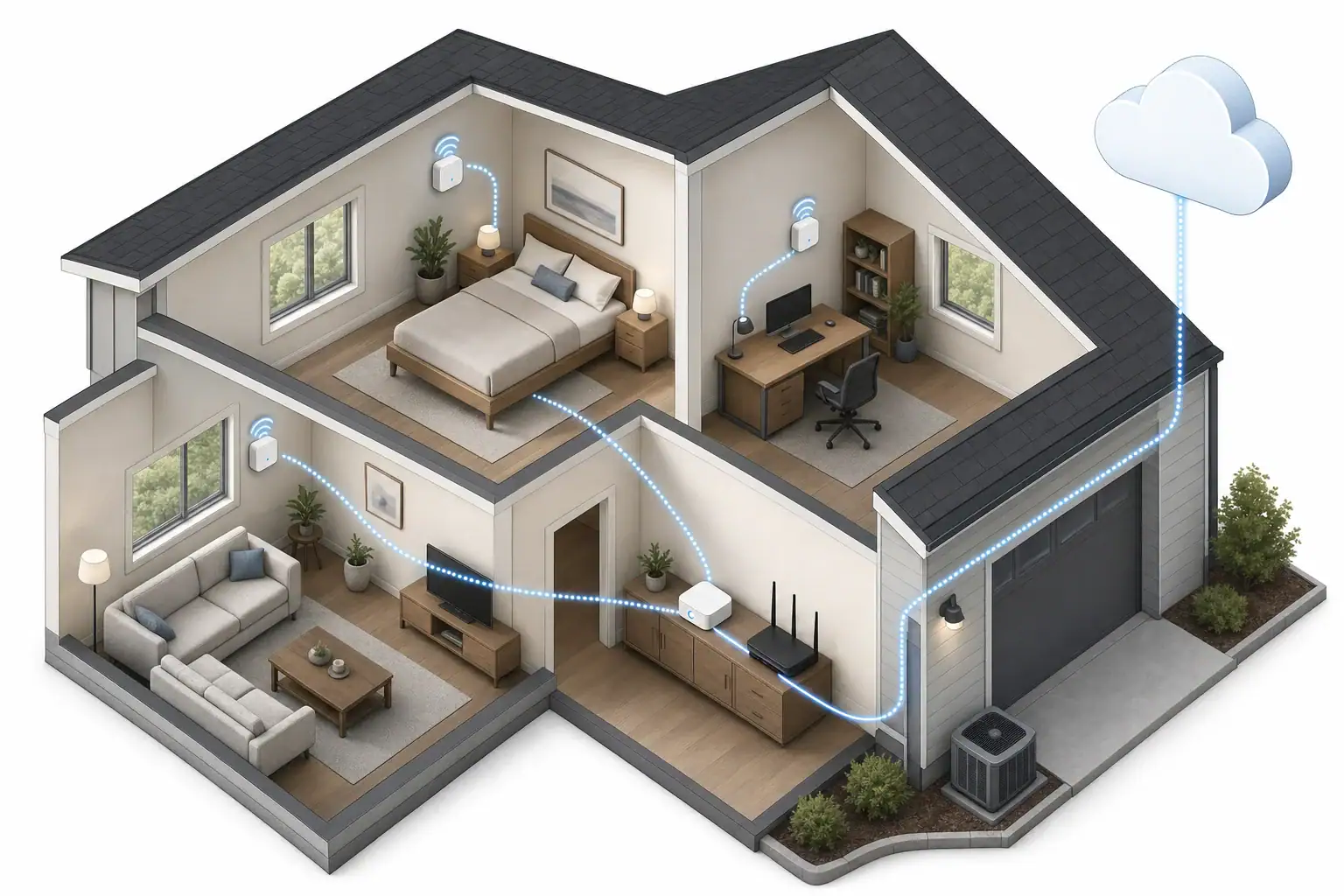
Design the air quality monitoring system around decisions
A home monitoring system should answer defined questions: Which rooms differ? When do conditions change? What household activity coincides with the change? What action should follow? Start with those decisions before choosing devices.
Consumer monitors measure only the pollutants or environmental factors their sensors are designed to detect. They do not represent every aspect of indoor air quality. The EPA notes limitations in information about the indoor performance of lower-cost monitors, so treat consumer readings as evidence of patterns and follow-up questions rather than a complete assessment of indoor air.
Write a monitoring goal for each occupied zone. Examples include comparing overnight bedroom patterns, tracking particle changes associated with cooking, observing humidity in a lower level, or determining whether a recurring change affects one room or the whole home.
One device, multiple monitors, or a connected system?
| Design | Suitable use | Advantages | Main limitation |
|---|---|---|---|
| One portable device | Short room surveys and source investigations | Lower complexity; the same sensor can compare locations sequentially | Cannot record simultaneous room differences, and moving it changes the measurement context |
| Fixed multi-room devices | Comparing occupied rooms over the same period | Continuous, simultaneous room histories | Separate apps, clocks, units, or export formats can complicate analysis |
| Connected multi-room system | Ongoing monitoring with one history and alert layer | Room-labeled alerts, coordinated timestamps, and centralized review | Greater dependence on networking, account security, cloud services, and vendor support |
A connected system is not automatically more reliable. Reliability depends on what each device does when Wi-Fi, internet service, household power, or the vendor’s cloud is unavailable.
Choose the sensor mix by room
Not every room needs every available sensor. Extra sensors increase cost, power use, and the amount of data that must be reviewed. Select measurements that relate directly to the room’s goal.
- Carbon dioxide, temperature, and humidity: useful for comparing occupied-room patterns and identifying changes associated with occupancy or ventilation. A consumer carbon dioxide sensor does not detect carbon monoxide.
- PM2.5: useful for tracking fine-particle changes over time and comparing rooms during activities such as cooking or when outdoor particle conditions change.
- VOC indication: useful primarily for trends within the same device. A general VOC reading does not identify every compound or establish what caused a change.
- Radon: a separate long-term measurement goal that requires a device and testing approach intended for radon; it should not be inferred from general indoor-air readings.
Keep smoke and carbon monoxide protection separate. The EPA states that consumer indoor-air monitor alerts are not designed to warn of immediate danger in the way certified smoke or carbon monoxide alarms do. The CPSC carbon monoxide guidance recommends CO alarms meeting UL 2034 on every home level and outside sleeping areas, preferably interconnected.
Coordinate sampling, timestamps, and logging
Sampling interval, display refresh, app refresh, and cloud-upload interval are different specifications. A device may take measurements more often than it uploads them. Battery and plug-in operating modes may also behave differently.
For example, Airthings documents different sampling and upload behavior for its View monitors depending on sensor and power mode. That is a manufacturer example, not a rule for all products. Check the manual and support documentation for every model in the system.
Before purchase or commissioning, document:
- How often each sensor takes a measurement.
- Whether the screen and app show current, averaged, or delayed values.
- How often records reach local or cloud storage.
- Whether timestamps include a time zone and daylight-saving changes.
- How missing periods are represented in charts and exports.
- Whether changing power modes alters sampling or upload behavior.
Use consistent room names and units across the system. If devices cannot share one platform, align their clocks and retain a simple device-to-room inventory so exported files can be combined correctly.
Decide where the history should live
Cloud storage can simplify remote access, notifications, and synchronization. It can also make access dependent on an account, internet connection, vendor retention policy, and continued service availability.
Local storage can reduce cloud dependence and may provide more direct control of data. It can require additional hardware, backups, and technical maintenance. Some devices support local dashboards or home-automation protocols without retaining a complete history on the monitor itself.
A hybrid design can provide a local display or buffer while also sending records to a shared dashboard. Do not assume that a local display means local historical storage, or that a cloud-connected device buffers readings during an outage. Confirm both behaviors in model-specific documentation. For example, AirGradient documents a local MQTT option for compatible setups, while that arrangement requires local network equipment and configuration.
Check data portability before committing
Export a sample file during the return or evaluation period when possible. Confirm that it contains timestamps, room or device identifiers, units, sensor fields, and a clear representation of missing records. Also check export period limits, file format, account-deletion options, and whether access requires an active subscription. Export policies vary: Airthings currently documents CSV export limits and procedures for its app, but those details do not apply automatically to other brands.
Build alerts around persistence and action
Single-reading alerts can create noise from brief activities or normal sensor variation. Where the platform allows it, define alerts around a sustained condition or repeated pattern rather than an isolated spike. Manufacturer color bands and default thresholds are not universal health limits.
Each alert rule should contain four parts:
- Measurement: the sensor and room involved.
- Duration: how long or how often the condition must persist.
- Action: the observation or household step the alert triggers.
- Escalation: what repeated or unexplained events require further investigation.
| Observed pattern | Initial response rule | Escalation question |
|---|---|---|
| Recurring bedroom CO2 increase during occupancy | Confirm occupancy and compare timing with ventilation conditions | Does the pattern persist across multiple occupied periods? |
| Particle increase near cooking periods | Record the activity and review cooking-source capture practices | Does the increase spread to other rooms or remain after the activity ends? |
| Persistent humidity difference between rooms | Check whether the difference follows occupancy, weather, or moisture-producing activities | Is there an unexplained moisture source or a need for building evaluation? |
| Simultaneous change across several rooms | Check shared influences such as outdoor conditions or HVAC operation | Do independent devices and external observations support the same pattern? |
Plan for power, Wi-Fi, and internet outages
Test four functions separately: measuring, displaying, retaining data, and sending alerts. A device may continue measuring locally while losing remote alerts, or it may display current values without retaining history.
- Power loss: determine whether the device has battery operation, how it restarts, and whether settings survive.
- Wi-Fi loss: determine whether readings are buffered and later uploaded, overwritten, or discarded.
- Internet or cloud loss: check whether local readings remain accessible and whether alerts depend on the cloud.
- Recovery: verify whether timestamps remain correct and whether the historical chart shows a gap, delayed backfill, or duplicated records.
Outage behavior is product-specific. For example, Awair documents limited offline data backfill for its Omni model, while other products may leave gaps. Do not infer outage performance from terms such as wireless, connected, or smart. Deliberate commissioning tests are more useful than assumptions, provided they do not disable required safety equipment.
Protect privacy and network access
Connected monitors may collect room names, occupancy-related patterns, network identifiers, and account information. Read the current privacy notice and identify what is stored, where it is processed, how long it is retained, whether it is shared, and how it can be deleted.
Use unique credentials, install firmware updates, enable two-factor authentication where offered, and turn off remote features you do not use. These steps align with FTC guidance for securing internet-connected home devices. A separate guest or connected-device network can also limit access to other household systems when the router supports it.
Worked example: a hypothetical three-room layout
Assumptions: This example is for a home with an occupied bedroom, a combined living room and home office, and a kitchen-adjacent area. The goals are simultaneous room comparison, overnight trend review, and identifying particle changes associated with cooking or outdoor conditions. It is an architecture example, not a universal device prescription.
- Bedroom: carbon dioxide, temperature, and humidity for occupied-period patterns. Notifications require persistence rather than one brief change.
- Living room/home office: carbon dioxide and PM2.5 to compare occupancy patterns and particle trends with the bedroom.
- Kitchen-adjacent area: PM2.5 positioned outside the direct cooking plume so it can track movement into the occupied area. If lower-level moisture or radon is the actual priority, that location and sensor mix should change accordingly.
All devices use synchronized timestamps, stable room names, and one review process. The homeowner records cooking, open-window periods, and unusual occupancy only when needed to interpret events. Independent certified smoke and CO alarms remain in service.
Commission the system methodically
Initial setup
- Record each device model, serial identifier, firmware version, assigned room, power source, and network connection.
- Document the measurement, display, upload, and retention intervals.
- Confirm location choices do not expose monitors to direct steam, cooking plumes, or other conditions excluded by their manuals. See where to place an air quality monitor for general placement considerations.
- Run comparable devices side by side before separating them into rooms.
- Observe occupied and unoccupied patterns before enabling numerous notifications.
Alert and continuity tests
- Trigger a test notification through the app or supported test function and verify the room name.
- Disconnect Wi-Fi temporarily and record what remains visible, what is stored, and how recovery appears.
- Test power-loss behavior only as allowed by the device instructions.
- Export a sample file and inspect its timestamps, units, identifiers, and missing-data treatment.
- Confirm account recovery, two-factor authentication, and data-deletion controls.
Monthly review
- Look for data gaps, flatlined values, clock errors, and devices that stopped reporting.
- Review battery state, firmware notices, and network reliability.
- Compare similar devices for developing disagreement.
- Remove alerts that produce no useful action and refine rules that miss recurring patterns.
- Save an export if long-term records matter and cloud retention is limited.
Use side-by-side checks without claiming calibration
Place comparable monitors together temporarily under the same conditions before assigning them to separate rooms. This can reveal major disagreement, clock differences, or a device that responds unusually slowly.
Agreement between two consumer devices does not prove accuracy, and disagreement does not identify which device is correct. EPA network guidance discusses collocating sensors with one another when a reference instrument is unavailable, but a household side-by-side check should be treated as a comparability screen rather than laboratory calibration. See the EPA air-monitoring network guidance.
When professional testing is more appropriate
Routine consumer monitoring is most useful for trends, timing, and room comparisons. Consider qualified professional assessment when the question requires identifying a specific contaminant, producing legally or contractually defensible results, investigating a suspected building or combustion problem, or using specialized sampling protocols.
A general monitor cannot identify mold species or determine what is hidden inside building materials. The EPA explains that mold sampling requires relevant expertise and that visible mold often does not require sampling in its mold testing and sampling guidance.
Do not use a general indoor-air dashboard to troubleshoot a CO alarm event or suspected acute combustion hazard. Follow the alarm instructions and applicable emergency guidance; the CPSC carbon monoxide fact sheet provides official safety information. If symptoms are unexplained or recurring, discuss them with an appropriate healthcare professional rather than attempting to diagnose them from monitor data.
Related guides: Indoor Air Quality Testing: DIY or Professional Help? • Radon Monitor vs Air Quality Monitor: What Each Device Measures • Air Quality Monitor False Alarms: Humidity, Sprays, Cooking, and Sensor Drift
Frequently asked questions
Can one portable monitor compare air quality between rooms?
Yes. It can support a sequential room survey or source investigation when the same device is moved between locations. It cannot show whether rooms differed at the same time, and moving it changes the measurement context. Use fixed monitors when simultaneous comparisons are the goal.
What should happen to monitoring data during a Wi-Fi outage?
That depends on the model. A monitor may buffer readings for later upload, keep only current local readings, or leave a gap in its history. Check the manufacturer documentation and test measuring, display, data retention, and alerts separately during commissioning. Do not assume that a cloud-connected monitor retains data while offline.
How can I tell whether monitors in different rooms are comparable?
Place comparable monitors together temporarily under the same conditions before assigning them to separate rooms. This can reveal major disagreement, clock differences, or unusually slow response. Matching readings do not prove accuracy, so treat the exercise as a comparability check rather than calibration.
Can an air quality monitor replace smoke or carbon monoxide alarms?
No. Consumer indoor-air monitor alerts are not designed to provide the immediate-danger warning supplied by certified smoke or carbon monoxide alarms. Keep independent certified smoke and CO alarms in service and follow alarm instructions for an alarm event or suspected combustion hazard.
A dependable system connects data to action
A useful multi-room setup combines room-specific measurements, synchronized history, documented outage behavior, and alerts tied to defined responses. Commission it before relying on trends, review it regularly, and preserve access to exported records. Treat consumer readings as evidence for patterns and follow-up questions—not as a complete assessment of indoor air or a substitute for certified alarms and specialized testing.
Recommended next:
- Indoor Air Quality Monitors: What to Measure (PM2.5, CO2, VOCs, Humidity)
- CO2 Monitors for Homes: What Good Numbers Look Like and Why They Matter
- VOC Sensors Explained: Why Readings Vary and How to Use Them Safely
- Where to Place an Air Quality Monitor: Height, Distance, and Rooms
- PM2.5 Sensor Accuracy: Why Readings Differ Between Devices
- CO2 Monitor Buying Guide: What to Look For (NDIR vs “eCO2”)
- Clear sizing logic (room size → CADR/ACH)
- HEPA vs carbon explained for real use-cases
- Humidity + ventilation basics to reduce mold risk